
From source files to finished output
A simple local workflow designed to keep your source documents on your computer.
One Excel file per source PDF. Nothing is combined into one workbook.
See the source file and the output it creates
Compare the source with the generated result. Click either preview to see the full-size file view.
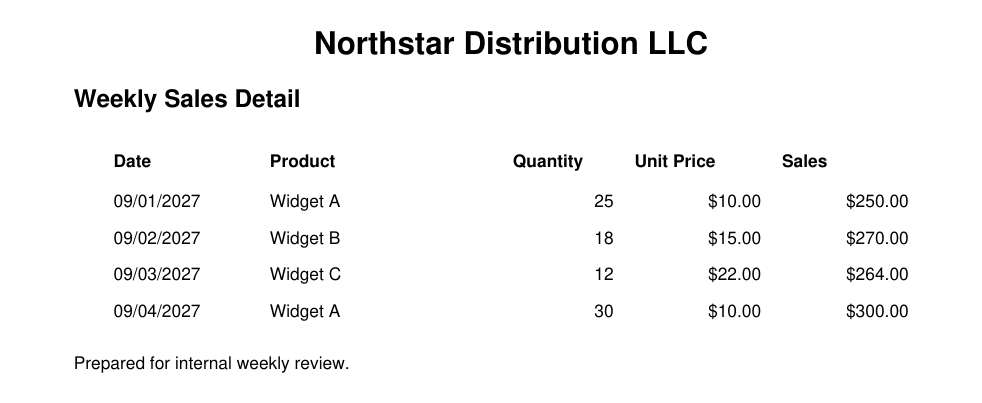
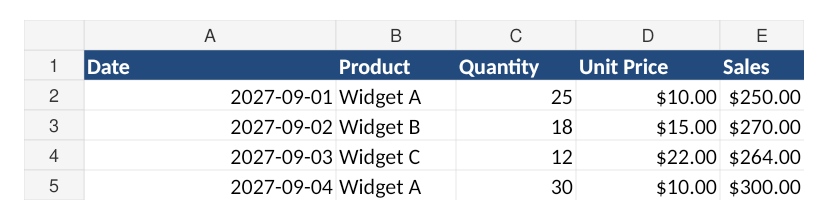
What is in the source
sales_january.pdf
Monthly Sales Report — January 2026
Region: Texas
Product | Units | Revenue
Widget A | 120 | $18,000
Widget B | 85 | $12,750

sales_february.pdf
Monthly Sales Report — February 2026
Region: Texas
Product | Units | Revenue
Widget A | 135 | $20,250
Widget B | 92 | $13,800
What the output contains
sales_january.xlsx
Sheet: Extracted Data
Product | Units | Revenue
Widget A | 120 | 18000
Widget B | 85 | 12750

sales_february.xlsx
Sheet: Extracted Data
Product | Units | Revenue
Widget A | 135 | 20250
Widget B | 92 | 13800
What your files can look like
What to expect: Each PDF becomes its own workbook. The Combined View preserves extractable headings, key/value context, tables and meaningful notes in source order; individual Table sheets keep structured data reusable. Source filenames are retained for traceability and numeric values remain numeric where safely recognized. Image-only/scanned content requires OCR and is flagged for review rather than silently omitted.
Digital text and structured files work best
No website upload required
Select your files inside the downloaded desktop app. Source documents are processed locally on your computer; the website is used for account, licensing and downloads.
Your original files are never modified. FilesStayLocal creates a new output file.
Try it without sharing your documents
Free Access duration: 2 hours. Duration is controlled by the license service.
Review matters when the source is ambiguous
FilesStayLocal is designed to preserve traceability and flag uncertainty rather than invent missing values. Highly inconsistent layouts, image-only sources and ambiguous fields can require human review.