
HOW IT WORKS

Free Multiple PDFs to One Excel Converter

Free access available now. No payment required during the current launch period.

Combine recurring business PDFs into one professional Excel workbook while preserving each report and consolidating compatible data.

Local processing & source-file safety. Your source files stay on your computer during normal document processing and are not uploaded to FilesStayLocal. The original source files are not modified; FilesStayLocal creates separate output files. Please review generated results before using them for important business or operational work.
High-level flow

From source files to finished output

A simple local workflow designed to keep your source documents on your computer.

1
Select your filesChoose the source files for this product inside the desktop app.
2
Process locallyFilesStayLocal reads them on your computer. No website upload is required.
3
Review the resultInspect the structured output and any review notes produced by the tool.
4
Save the new fileYour originals stay unchanged; the tool creates a separate output file.
PDF A
PDF B
PDF C
→
One Excel workbook
Example

See the source file and the output it creates

Compare the source with the generated result. Click either preview to see the full-size file view.
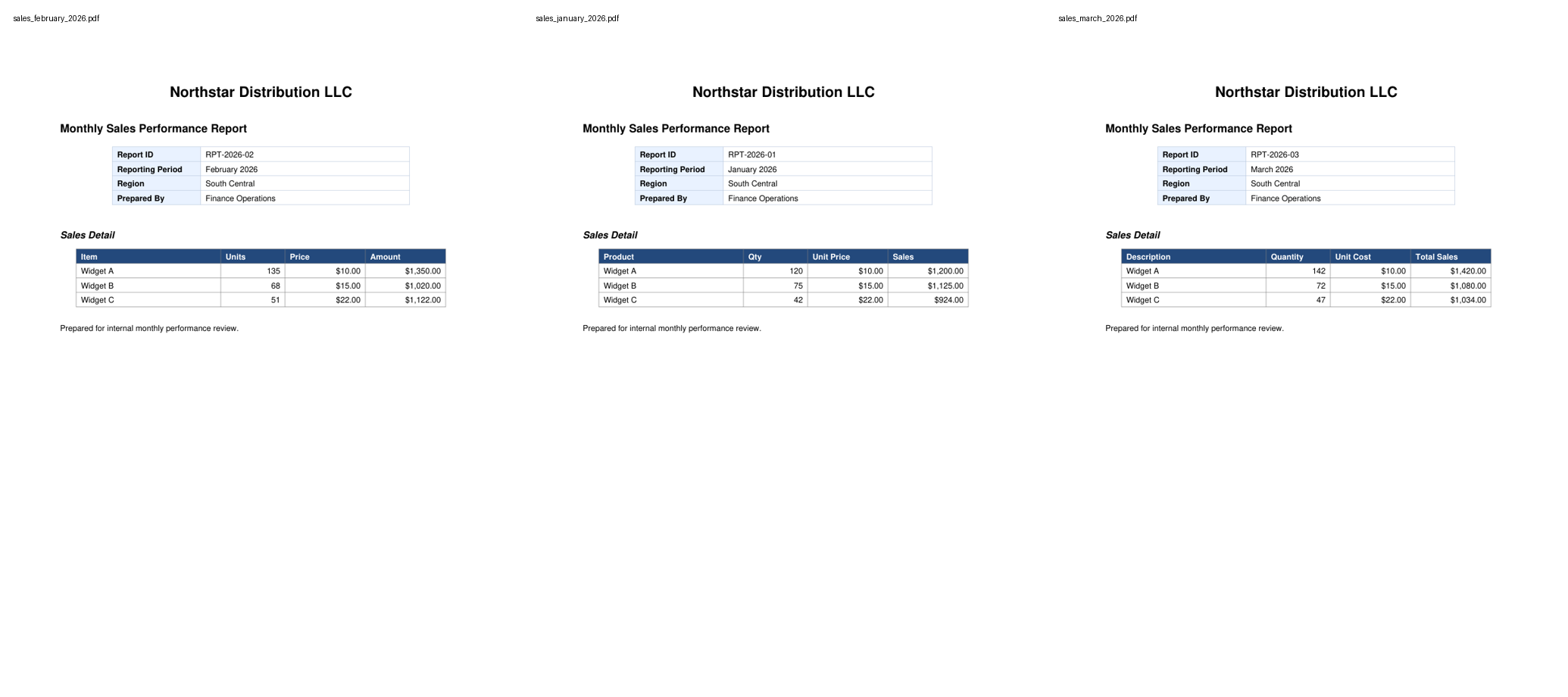
ZIPSource file
Open file
Source file preview
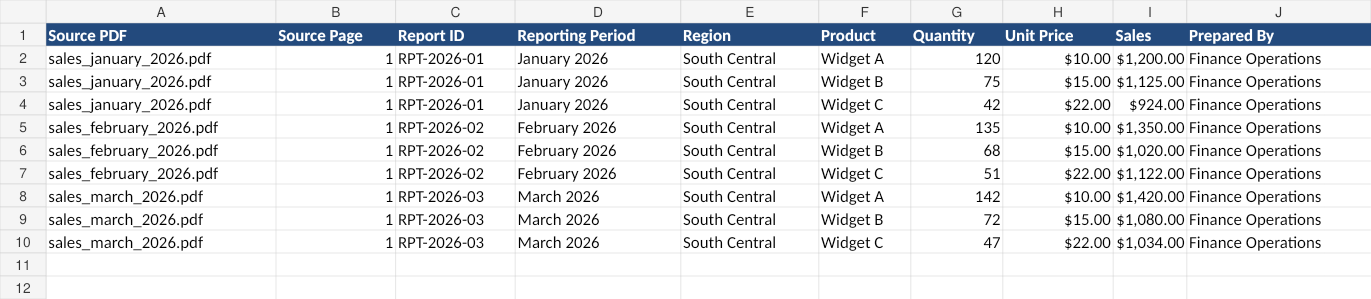
XLSXGenerated output
Open file
Generated output preview

What is in the source

JANUARY SALES
Region: Texas
Product | Units | Revenue
Widget A | 120 | $18,000
Widget B | 85 | $12,750

FEBRUARY SALES
Region: Texas
Product | Units | Revenue
Widget A | 135 | $20,250
Widget B | 92 | $13,800

What the output contains

Sheet: January
Widget A | 120 | 18000
Widget B | 85 | 12750

Sheet: February
Widget A | 135 | 20250
Widget B | 92 | 13800

Sheet: Combined Report
Month | Product | Units | Revenue
Jan | Widget A | 120 | 18000
Feb | Widget A | 135 | 20250
Supported source patterns

What your files can look like

Recurring same-shape reportsHeader metadata + tableDifferent row countsRepeated headersMulti-page tablesMild column-order differences

What to expect: Source-specific sheets are preserved and compatible tables are consolidated. Files that do not safely match the combined schema remain traceable instead of being silently forced together.

Source quality

Digital text and structured files work best

Best resultsText-based PDFs or structured spreadsheet/text files where content can be read normally by the desktop app.
Complex layoutsHeaders, repeated page headings, multiple tables, mixed narrative + tables and missing optional values are handled conservatively when the product supports them.
Scanned/image-only PDFsOCR is not enabled yet. Image-only inputs are detected and flagged for review instead of silently producing unreliable data.
Privacy

No website upload required

Select your files inside the downloaded desktop app. Source documents are processed locally on your computer; the website is used for account, licensing and downloads.

Your original files are never modified. FilesStayLocal creates a new output file.

Access

Try it without sharing your documents

Free Access duration: 2 hours. Duration is controlled by the license service.

Important limitation

Review matters when the source is ambiguous

FilesStayLocal is designed to preserve traceability and flag uncertainty rather than invent missing values. Highly inconsistent layouts, image-only sources and ambiguous fields can require human review.